Choosing a home wireless label printer for multiple devices is easier when you focus on connectivity, label type, and everyday convenience. The best picks should work smoothly across phones, tablets, and computers without adding setup headaches.
Whether you need shipping labels, file labels, or pantry organization, the right printer can save time and keep your workspace tidy. Below, we break down what matters most so you can match the right model to your setup.
Best 10 Home Wireless Label Printer for Multiple Devices Picks for 2026
Wireless All-Rounder
MUNBYN Bluetooth Thermal Label Printer 130B

- Bluetooth app printing for iOS and Android
- Chrome web printing for Windows, macOS, and desktop use
- Supports 4x6 shipping and many smaller label formats
Best For: multi-device homes and small sellers needing flexible wireless label printing
Speedy Network Pick
Brother QL-810Wc WiFi Label Printer

- Prints up to 110 address labels per minute
- Wireless network sharing plus USB connection
- Works with mobile devices on a wireless network
Best For: fast label printing in shared home or office networks
Compact Organizer
SUPVAN T50M Pro Bluetooth Label Maker

- Bluetooth printing from iOS and Android devices
- Free app with 30+ fonts and 660+ icons
- Waterproof, inkless labels for home and office use
Best For: small-space organization and light-duty multi-device labeling
Most Flexible Connection
Brother QL-820NWB Label Printer

- Bluetooth, WiFi, Ethernet, and USB connectivity
- LCD screen supports standalone use
- Up to 110 labels per minute with black/red output
Best For: shared home offices needing maximum device and network flexibility
Portable Bluetooth Label Printer
KNAON 4x6 Thermal Shipping Printer

- Bluetooth and USB support for many devices
- Fast thermal printing for 4x6 labels
- App offers templates, icons, and fonts
Best For: Home sellers who need cross-device shipping label printing
Professional Bluetooth Label Maker
Brother PT-D610BT Connected Label Maker

- Bluetooth and USB for multi-device labeling
- Built-in cutter and LCD improve workflow
- Stores frequent labels and business templates
Best For: Professional home office labeling and inventory organization
Compact App-Based Label Maker
NIIMBOT B1 Blue Portable Label Maker
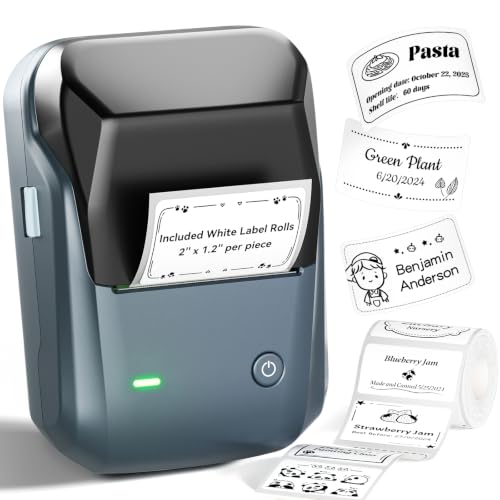
- Bluetooth for iOS and Android plus USB for PC
- Inkless thermal printing with rechargeable battery
- App includes templates, fonts, borders, and symbols
Best For: Quick home and office labeling from phones and PCs
Smartphone-Friendly Home Labeling
Brother P-Touch Cube Color Smartphone Label Maker

- Bluetooth printing from Apple and Android devices
- 450 symbols, 60+ frames, and multiple fonts
- Uses durable laminated TZe label tapes
Best For: Households that want easy app-based labeling from both iPhone and Android
Shipping-Ready Dual-Connection Labeler
Thermal Shipping Label Printer 4x6 Bluetooth Label Maker

- Bluetooth and USB works with phones, Macs, PCs, and tablets
- No ink or toner needed with direct thermal printing
- Built for 4x6 shipping labels and major e-commerce platforms
Best For: Home sellers who need wireless and USB label printing across multiple devices
Ultra-Portable App Labeler
Nelko P21 Bluetooth Label Printer

- Pocket-sized Bluetooth label maker for iOS and Android
- App offers 3,600+ icons and 750+ templates
- Rechargeable and designed for portable use
Best For: Mobile-first users who want a tiny Bluetooth label maker for home organization
Wireless All-Rounder – MUNBYN Bluetooth Thermal Label Printer 130B
If you want a home wireless label printer for multiple devices, the MUNBYN 130B is built around flexible setup and broad label support. It connects by Bluetooth to iPhone, Android, iPad, Windows, macOS, and Chrome-based workflows, with app-based printing on mobile and browser-based printing on desktop.
Best For: Home users, small businesses, and sellers who need one printer that can handle shipping, branding, and organization labels across phones, tablets, and computers.
Pros:
- Works with iPhone, Android, iPad, Windows, macOS, Chrome, and USB desktop connections.
- Supports 4×6 shipping labels plus a wide range of smaller label sizes and specialty series.
- Offers 3,500+ elements, 2,000+ templates, 80+ fonts, plus PDF/TXT import and OCR.
- Compatible with major platforms including FedEx, UPS, USPS, Amazon, Shopify, Etsy, and eBay.
Cons:
- Bluetooth-less desktops need USB instead of wireless pairing.
- Notes mention possible issues with UPS thermal paper.
- Best results are recommended with genuine MUNBYN thermal label paper.
The 130B is a practical choice if you want one label printer to cover shipping and everyday labeling without installing software on every device. Its real strength is the mix of mobile app printing, Chrome-based desktop support, and label-size flexibility.
Speedy Network Pick – Brother QL-810Wc WiFi Label Printer
The Brother QL-810Wc is a strong pick if you need a home wireless label printer for multiple devices and care more about speed than customization bells and whistles. It supports WiFi and USB connectivity, and can print from a mobile device when connected to a wireless network.
Best For: Busy households or home offices that want ultra-fast label printing for envelopes, packages, folders, and badges from shared wireless access.
Pros:
- Ultra-fast output of up to 110 standard address labels per minute.
- Supports wireless printing and sharing on a network, plus USB connectivity.
- Can create cost-effective paper labels for packages, envelopes, file folders, name badges, and postage.
- Prints black/red labels with DK-2251 media.
Cons:
- Supports 2.4 GHz WiFi only.
- Wireless bands need separate names to avoid connectivity disruptions.
- Focused on monochrome label work rather than broader label design features.
This model stands out for speed and straightforward network sharing. If your priority is getting labels out quickly from multiple devices on the same wireless network, it’s one of the most efficient options here.
Compact Organizer – SUPVAN T50M Pro Bluetooth Label Maker
The SUPVAN T50M Pro is a compact choice for anyone looking for a home wireless label printer for multiple devices, especially for everyday organization. It connects through Bluetooth to Android and iOS devices, and its app is designed for quick label creation without ink or toner.
Best For: Home, school, and office users who want a small, easy label maker for organizing containers, folders, cables, and basic small-business labels.
Pros:
- Bluetooth printing from smartphones, tablets, laptops, and PCs.
- Free app with 30+ fonts, 50+ frames, and 660+ icons.
- Auto label size recognition and no-registration setup make it easy to use.
- Supports waterproof label use and a range of label styles like square, round, cable, and file labels.
Cons:
- Print width is limited to 3/4″ to 2″ labels.
- Designed for monochrome labels only.
- Best suited to smaller labeling jobs rather than shipping-label volume.
This is a convenient everyday label maker if you want fast Bluetooth printing and a simple app for organizing home or work spaces. It’s less about large-format shipping and more about compact, versatile labeling.
Most Flexible Connection – Brother QL-820NWB Label Printer
If you need a home wireless label printer for multiple devices, the Brother QL-820NWB is the most connection-flexible option in this group. It supports Bluetooth, WiFi, Ethernet, and USB, and also includes an easy-to-read LCD for standalone use.
Best For: Home offices, shared workspaces, and multi-user setups that want one label printer with the broadest connectivity options.
Pros:
- Multiple connection choices: Bluetooth, WiFi, Ethernet, USB, and USB host.
- Prints up to 110 standard address labels per minute.
- Standalone operation is possible thanks to the built-in LCD screen.
- Supports black/red labels with DK 2251 media.
Cons:
- Wireless networking is 802.11b/g/n, so setup is more network-oriented than app-only models.
- Maximum label length is 3 feet, which still keeps it focused on label work rather than broader printing.
- Monochrome output limits it to functional labeling.
The QL-820NWB is the strongest fit when multiple devices and connection types matter more than portability. Its combination of wireless, wired, and standalone use makes it especially useful in shared environments.
Portable Bluetooth Label Printer – KNAON 4×6 Thermal Shipping Printer
If you need a home wireless label printer for multiple devices, the KNAON Bluetooth thermal model is built around flexible connectivity. It works with mobile devices through the FlashLabel Pro app, and it also supports Windows, macOS, USB, ChromeOS, and Linux, making it a practical pick for households or side hustles that print from more than one platform.
Best For: Home sellers and small business users who want a compact shipping-label printer that can handle phones, laptops, and desktop setups.
Pros:
- Supports Bluetooth and USB printing across iPhone, Android, Windows, Mac, ChromeOS, and Linux.
- Fast thermal printing up to 180 mm/s with support for paper widths from 1.5 to 4.2 inches.
- Includes app-based design tools with 3,000+ templates, 5,000+ icons, and 100+ fonts.
- Compact size makes it easy to store in a home office or packing station.
Cons:
- Bluetooth printing requires the FlashLabel Pro app rather than direct device pairing.
- Mobile users need to work through the app workflow to print shipping labels.
- Best suited to label printing rather than general document printing.
Overall, this KNAON printer is a strong fit if you want one device that can serve multiple computers and mobile devices without taking up much space. The tradeoff is that setup relies on the companion app, but the broad platform support is the main reason to consider it.
Professional Bluetooth Label Maker – Brother PT-D610BT Connected Label Maker
Brother P-Touch PT-D610BT Business Professional Connected Label Maker with Bluetooth®
Check Price On AmazonThe Brother PT-D610BT is a practical choice if you want a home wireless label printer for multiple devices that feels more office-ready than basic label makers. With Bluetooth and USB connectivity, it lets multiple users create labels from computers or mobile devices, while the built-in display, keyboard, and cutter make it easier to handle frequent labeling tasks at home or work.
Best For: Users who want a durable, professional label maker for inventory, asset tags, and organized home-office labeling.
Pros:
- Bluetooth and USB connectivity support label creation from computers and mobile devices.
- Built-in cutter, QWERTY keyboard, and 20-character color LCD simplify everyday use.
- Includes 175 business-specific templates and access to Brother P-touch Editor software.
- Stores up to 90 frequently used labels for fast reprinting.
Cons:
- Uses Brother Genuine TZe label tapes rather than generic label rolls.
- Designed for labels up to 24mm wide, so it is not a shipping-label printer.
- More focused on professional label organization than casual home crafting.
For buyers who value polished results and repeatable label workflows, this Brother model stands out. It is especially useful when several people may need to create consistent labels across devices, but it is better suited to tape labels than large-format shipping jobs.
Compact App-Based Label Maker – NIIMBOT B1 Blue Portable Label Maker
If you want a home wireless label printer for multiple devices without a bulky setup, the NIIMBOT B1 is an easy mobile-first option. It connects by Bluetooth to iOS and Android through the NIIMBOT app, and it also supports PC use over USB, making it handy for quick organization tasks across different devices at home.
Best For: Home organizers and small-business users who want a compact, inkless label maker for phones and PCs.
Pros:
- Bluetooth works with iOS and Android, and PC printing is available through USB.
- Inkless thermal printing keeps operation simple and mess-free.
- App auto-detects label size and includes fonts, borders, symbols, and saved templates.
- Compact, rechargeable design is easy to use for home, office, and retail tasks.
Cons:
- Not compatible with tablets.
- Best for labels up to 2 inches wide, not large shipping labels.
- Bluetooth setup depends on the NIIMBOT app.
This NIIMBOT model is a good fit when your priority is quick, portable label printing rather than heavy-duty production. Its app features and multi-device support make it convenient for everyday home organization, especially if you mostly print from a phone and occasionally from a PC.
Smartphone-Friendly Home Labeling – Brother P-Touch Cube Color Smartphone Label Maker
If you want a home wireless label printer for multiple devices, the Brother P-Touch Cube is a compact option built around smartphone and tablet control. Using the Design&Print2 app, you can create labels over Bluetooth from Apple or Android devices, choose from preset templates, and print laminated TZe labels for everyday organizing tasks.
Best For: Households that want a simple, app-driven label maker for organization from both iPhone and Android devices.
Pros:
- Works with both Android and Apple devices through the Design&Print2 app.
- Bluetooth wireless printing makes it easy to label from a phone or tablet.
- Offers 450 symbols, 60+ frames, and multiple fonts for customization.
- Uses durable laminated Brother TZe tapes in widths up to 12 mm.
Cons:
- Designed for mobile device use rather than computer printing.
- Print output is limited to small-format label tape.
- Best suited to lighter home labeling rather than high-volume shipping tasks.
The Brother P-Touch Cube is a practical pick if you want a neat, portable label printer that keeps home organization simple. Its app-based workflow and broad mobile compatibility make it especially appealing for mixed-device households.
Shipping-Ready Dual-Connection Labeler – Thermal Shipping Label Printer 4×6 Bluetooth Label Maker
For a home wireless label printer for multiple devices that can also handle heavier shipping jobs, this NULLTONEX thermal printer is built around Bluetooth and USB connectivity. It supports phone, laptop, PC, Mac, and tablet use, and the app includes templates and editing tools for printing shipping labels, barcodes, and mailing labels without ink or toner.
Best For: Home-based sellers and busy organizers who want one printer for wireless phone printing and direct USB computer use.
Pros:
- Bluetooth and USB dual connectivity supports phones, laptops, Macs, PCs, and tablets.
- Direct thermal printing means no ink or toner is required.
- 203 DPI output and up to 150 mm/s print speed suit faster label runs.
- Works with Amazon, Shopify, Etsy, USPS, UPS, FedEx, and DHL.
Cons:
- Prints in black and white only.
- Primarily focused on 4″x6″ shipping labels, so it is less of a decorative home label maker.
- Best for label workflows rather than general document printing.
This is the most versatile choice here if your home setup needs to move between wireless phone printing and plugged-in computer use. It is especially useful when shipping volume matters, since it is designed for speed, platform compatibility, and low-maintenance operation.
Ultra-Portable App Labeler – Nelko P21 Bluetooth Label Printer
The Nelko P21 is a compact home wireless label printer for multiple devices, but with a clear mobile-first focus. It connects to iOS and Android phones over Bluetooth, uses the Nelko app for templates and design tools, and is small enough to carry around for quick labeling at home, school, or the office.
Best For: People who want a pocket-sized Bluetooth label maker for phone-based labeling and everyday home organization.
Pros:
- Very small and lightweight for easy portability.
- Connects to iOS and Android phones via Bluetooth.
- App includes 3,600+ icons, 700+ borders, 5,500+ materials, and 750+ templates.
- Rechargeable battery supports extended use without constant recharging.
Cons:
- Does not work with computers.
- Not compatible with Google phones running Android 14.
- Prints monochrome labels only, with no direct color printing.
If your priority is compact size and phone-only convenience, the Nelko P21 is an easy pick. It is best for light-duty labeling where portability and app customization matter more than desktop compatibility.
How We Picked the Best Home Wireless Label Printer for Multiple Devices
We focused on printers that are practical for mixed-device households and small workspaces. Priority went to reliable wireless connectivity, broad app support, easy setup, label quality, and enough flexibility for common home and office tasks.
We also considered whether each option handles the most useful label formats, from 4×6 shipping labels to smaller organization labels, since a Home Wireless Label Printer for Multiple Devices should do more than one job well.
Quick Comparison
In general, the best fit depends on your main use case: shipping and ecommerce, desktop-heavy office labeling, or simple phone-based organization. Thermal shipping printers are usually the fastest for postage and package labels, while compact Bluetooth label makers are better for shelves, cables, folders, and household storage.
Key Buying Factors for a Home Wireless Label Printer for Multiple Devices
Connectivity and Device Compatibility
Look for Wi-Fi, Bluetooth, USB, or multi-mode support if several people or devices will use the printer. If you switch between iPhone, Android, Mac, and Windows, check app availability and whether setup is simple across platforms.
Label Size and Media Support
Make sure the printer supports the label sizes you actually need. For shipping, 4×6 thermal labels are the standard. For home organization, a smaller tape or narrow label format may be more useful.
Print Speed and Volume
If you print often, speed matters. Faster models can handle batch jobs better and reduce downtime, while lighter-duty label makers are fine for occasional use.
App Features and Editing Tools
Templates, fonts, icons, barcode support, and saved layouts can make labeling much easier. Strong software is especially helpful when multiple devices share one printer.
Cost of Ownership
Compare not just the printer price, but also consumables, label roll compatibility, and whether the printer uses ink or thermal printing. Thermal models often have lower ongoing maintenance.
Who Should Buy Which Home Wireless Label Printer for Multiple Devices?
If you ship regularly from home or run a small online store, a fast thermal shipping printer is the most efficient choice. If your needs are mostly household organization, cable labeling, or school and office use, a compact Bluetooth label maker is usually the better value.
If multiple family members or coworkers need access, prioritize a model with broad wireless support and easy app syncing. That way, your Home Wireless Label Printer for Multiple Devices stays convenient instead of becoming one more gadget to manage.